

So last week, I posted a giveaway for one of the most fabulous crafting tools known to man- and mousekind: The Silhouette Digital Cutting Tool.
If you haven’t entered yet, click here to read the post and learn how to enter to win. The contest ends TONIGHT at Midnight EST.
If you need any more convincing about how cool this thing is, here’s a walk-through of how it works, including a video of the tiny digital ninja in action.
OK, so here’s the box.

Like I said, you can use this little beastie to make all sorts of crafts and sundries, including:

The box says that it’s easy to use, and it really is.
The hardest part is setting it up the first time, and that’s not even that hard. The biggest blunder I made was not fully removing all the packing tape that secured the inside cutter (totally my fault). Once I figured that out and removed it, the cutter worked like a charm.

The box included diagrams of what each part does, so you can see what the different parts do (you know how I love visual diagrams…)

Out of the box
Here’s the Silhouette machine sitting on my table.

The digital display is easy to read and use.

The front panel flips up to reveal the cutting apparatus.

Fire up the computer & start designing!
The software is easy to install…just pop in the CD and follow the instructions that show up on your screen. Once it’s installed, launch the program.
You’re greeted with a blank page. This is your canvas, so to speak.

Now, you can create your own own design, import an existing design, or choose from one of the included clip-art images.

Seeing as Halloween is just around the corner (and we do live in Salem, MA, so I need to get a jump on decorating for the season…), I picked the spiderweb image as the first one to test. It’s also fairly intricate, so I figured it would really show how well the Silhouette cuts.
So you click on the design…

…and it shows up on your blank canvas. You can resize it, etc., just like you would resize a picture in programs like Microsoft Word or Adobe Photoshop…just click on the side or corner and drag until you’re happy with the new shape.

Once you’re happy with your design, it’s time to load the paper.
Loading the paper
The Silhouette comes with 2 cutting mats. One that’s thinner, for regular paper, and one that’s thicker, for vinyl and other substrates.

The cutting mat is sticky, so you have to peel off the center protective panel.

Grab your paper. I used regular old, text-weight printer paper for my spiderweb test.

Stick the paper to the cutting mat. The mat has a grid on it so you can be sure to align it correctly for cutting.

Commence cutting!
Position the mat on the cutter (there are markers to show you where). Press the “Load” button on the machine’s digital control panel. It will suck the mat in, align it, and then hold ready for cutting.

When the mat is loaded and your design is set, click the “Craft ROBO” button on the toolbar.

The program will take you through a series of screens that asks you about this size of your paper and the weight, etc. It will tell you what blade to load onto the cutter, etc. Just follow the on-screen steps. There’s even a tip at the bottom of each screen to clarify what you’re supposed to enter.

Once you’ve selected the right settings, you’re ready to cut!
*dramatic music*
Click CUT and watch the machine go to work.

Go, tiny ninja, go!
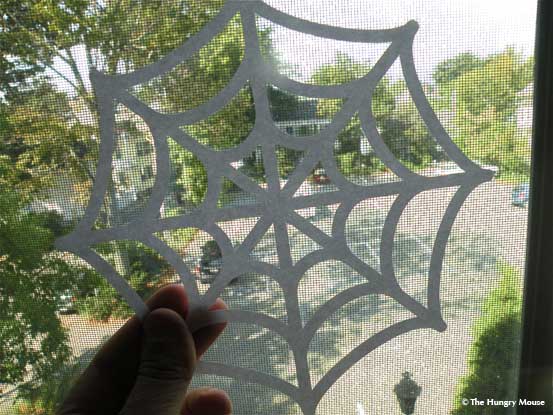
The finished product
Once your design is cut, you have to peel it off the mat.


How cool is that?


Convinced that you need one?
I thought you might be! I can’t wait to get down to some serious holiday crafting.
Click here to enter to win one.
Two Fabulous Money-Saving Promotions
If you can’t wait to see if you won and absolutely have to have one, like, right now (and I don’t blame you, this thing is awesome), use the following codes for special savings.
1) Code = “AWESOME PROMO†(Ends tonight, September 30, 2010 at midnight EST)
Buy a machine for $249.99 and receive the following (a savings of $137.97! Just think of how much you’ll save on gift giving this year…):
- $50 off the Silhouette Craft Cutter
- fuzzy white vinyl (Valued at $7.99)
- light blue smooth heat transfer (Valued at 14.99)
- yellow flocked heat transfer (Valued at $14.99)
- Home Décor CD (Valued at $50)
- $10 Gift Card to the Silhouette Download Store (comes in the box)
- Cutting Blade (comes in the box)
- 2 Cutting Mats (comes in the box)
2) Code = “GOOD PROMO†(valid from October 1, 2010 – October 4, 2010 at midnight EST)
Buy a machine for $249.99 and receive the following (a savings of $79.98):
- $50 off (receive for $249.99)
- 2 rolls of Heat transfer ($29.89 value)
- $10 Gift Card to the Silhouette Download Store(Comes in the Box)
- Cutting Blade (comes in the Box)
- 2 Cutting Mats (comes in the Box)
Good luck!!!